


Bloomz
3.85.83K Reviews
App Specs
- Version
- 6.2.8
- Updated On
- License
- Free
- Downloads
- 1,000,000+
- Developer
- Bloomz
- Categories
- Education
- Platform
- Android
Screenshots
 Analysis by AppCompare
When school communication is scattered across paper notes, email threads, messaging groups, and last-minute reminders, even a small change can become surprisingly difficult to follow. Bloomz is designed for that exact education problem: it brings parent communication into one app instead of asking families to keep checking several channels. I found it most useful when a teacher or school wants a clear path from sending information to getting a response, rather than simply broadcasting another message.
Bloomz is a free education app developed by Bloomz for families, teachers, and school communities. It is available to an Everyone audience, and the app has been around since October 18, 2014. Its current version is 6.2.8 and it supports Android devices running Android 7.0 or later. The large user base—over one million installs—makes it feel like an established classroom communication tool rather than a new experiment.
My overall impression is positive, but with an important qualification: this is only as effective as the school or classroom’s willingness to use it consistently. If every teacher posts in a different place, or if parents still receive essential information through unrelated channels, Bloomz cannot magically create order. When the community agrees on a routine, however, it can turn a messy communication chain into a much more manageable daily workflow.
How Bloomz fits into a real school communication workflow
I find Bloomz most useful when a school treats it as part of a routine rather than an occasional place to post reminders. In this section, I’ll look at how the app can support the handoff from a teacher’s message to a family’s next step, including a practical way to keep several caregivers aligned. That workflow also makes it easier to judge whether the app feels dependable in day-to-day use.
Starting with the family’s actual problem
Imagine a normal weekday. A child comes home with a reminder about an upcoming activity, but the details are incomplete. The parent wants to know what is needed, whether permission is required, and how to respond. In a traditional setup, that might mean searching through email, asking another parent, or waiting for the child to remember. Bloomz gives the school a central place to put the message and gives the family a predictable place to look.
That starting point matters more than it sounds. Parent communication is not only about sending announcements; it is also about reducing uncertainty. A message can contain the practical context that a child may forget on the way home. Parents can then read the information when they have time instead of relying on a paper slip being kept safe in a backpack.
I also like the fact that the app is not aimed only at one narrow type of communication. It can serve as a bridge between classroom updates, school-wide information, and parent responses. That makes it more useful than a basic announcement board, although the experience depends heavily on how carefully the school separates different kinds of messages.
Worth Reading Before You Choose

EA SPORTS FC Mobile 26 Is a Bigger Football Game, but It Takes Time

Flipboard Shows What News Apps Must Do Beyond the Feed

Switching to Android Auto Means Rethinking Your Driving Routine

Google Calendar Makes a Crowded Week Easier to Manage

Ludo King Makes the Most of the Minutes Between Plans

Baby Panda World Brings Quick Play to Modern Phones, but Its Game Library Feels Busy
There is a trade-off here. A single communication app can simplify the routine, but it can also become another notification source. If staff post every minor thought, families may stop recognizing which updates deserve immediate attention. The best use is selective: important information, clear follow-ups, and a consistent rhythm.
Step one: setting up the communication space
The first practical step is joining the relevant classroom or school community. From a parent’s point of view, this is where the service either becomes useful or remains empty. The app needs the correct connection between the family and the child’s educational setting. Once that connection is in place, the parent can use Bloomz as a dedicated channel instead of trying to reconstruct the school’s communication habits alone.
For teachers, the setup is less about installing an app and more about deciding how the communication will be organized. A classroom can become easier to follow when routine notices, requests, and conversations have a recognizable home. Without that structure, one long stream can become just as confusing as a crowded inbox.
My advice is to treat the first week as a sorting exercise. Rather than immediately responding to everything, I would identify which posts require action, which are simply informational, and which conversations should remain private. That habit prevents the app from becoming a digital pile of unread obligations.
Families may also wonder whether Bloomz replaces every other school channel. I would not assume that. In real school life, different institutions keep different procedures, and some information may still arrive elsewhere. Bloomz works best when the school clearly tells parents what belongs in the app and what does not. If you are joining a classroom, ask where urgent notices, attendance matters, and formal paperwork are handled so you do not mistake convenience for a complete administrative system.
Step two: turning a message into an action
A useful communication flow does not end when a teacher presses send. The message has to help the parent understand what to do next. For example, a classroom update about an activity should make the requested response obvious: read the details, prepare something, acknowledge the information, or contact the teacher if there is a problem.
This is where Bloomz has a practical advantage over a general social network. The context is already educational. A parent is not entering a broad public feed and trying to work out which posts matter. The surrounding relationship is the classroom or school, so the information has a clearer purpose.
I found that the most effective habit is to read a post once for context and a second time for the action it creates. That sounds simple, but it helps separate “my child’s class is doing something” from “I need to send something in by a certain day.” It also reduces unnecessary back-and-forth with the teacher.
Teachers can improve the handoff by putting the requested action near the beginning of a message and keeping extra explanation underneath. Parents often check school communication between work, travel, and household tasks. A message that makes the next step visible is more useful than one that is warm but vague.
Bloomz is free to download and use as an app, but in-app purchases range from $0.99 to $124.99 per item. That does not automatically make the basic experience unsuitable, yet it is worth remembering if you are evaluating additional paid elements or if a school is considering a broader arrangement. I would check what your particular classroom expects before assuming that every part of the experience is included at no cost.
Step three: managing replies without losing the thread
The next stage is the response. A parent may need to confirm that a notice was seen, ask a question, or explain a child’s situation. A teacher may need to clarify details for one family without turning the entire classroom conversation into a long debate. This is the point where communication apps often succeed or fail.
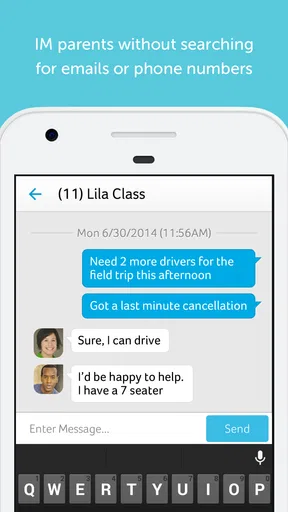
Bloomz is most helpful when replies stay connected to the original school context. Instead of starting a separate conversation in a personal messaging app, the family can respond through the same educational channel. That creates a more understandable record for the people involved and reduces the chance that a key answer disappears inside an unrelated chat.
There is still a judgment call about where to reply. A question that affects everyone belongs in a shared classroom conversation because the answer may help other families. A question about one child should be handled privately whenever possible. I would not use a public classroom thread for sensitive personal details simply because it is the easiest button to press.
This is one of the less obvious strengths of a dedicated parent communication app: it can teach a community to distinguish between shared information and individual follow-up. That distinction is valuable even when the actual message is short. It protects everyone’s attention and makes the teacher’s workload more manageable.
The handoffs between teacher, parent, and school
A school communication workflow usually has several handoffs. The teacher creates or shares the information. The parent receives it and decides whether action is needed. The parent may then respond, prepare something at home, or pass the relevant details to another caregiver. Finally, the teacher or school may need to confirm, answer, or update the original plan.
Bloomz is well suited to the first two handoffs: getting classroom information in front of families and giving parents a direct place to react. It is less about replacing the school’s internal processes and more about making the family-facing part easier to follow.
A realistic example would be a caregiver who is not the person who normally handles school messages. With one shared communication routine, that caregiver can review the same classroom information rather than relying on a verbal summary at the end of the day. This is especially useful in households where pickup, homework, and school preparation are divided among several adults.
Another useful workflow is preparing for a busy morning. I would check Bloomz the evening before, identify any request that needs physical preparation, and deal with questions before the school day begins. That small change turns the app from a reactive notification box into a planning tool.
The handoff can break down when the family has too many children, classrooms, or school communities connected at once. A parent may have to mentally sort one child’s information from another’s. In that situation, a simple personal routine helps: check each relevant classroom separately, handle action items immediately, and avoid leaving important posts buried under general updates.
What the completed workflow feels like
When the process works, the result is not necessarily exciting. It is calmer. A parent sees the message, understands its purpose, completes the requested task, and knows where to ask a follow-up question. The teacher spends less time repeating the same explanation through separate channels. The school has a more consistent way to keep families informed.
That is why I see Bloomz as a coordination tool rather than a replacement for personal contact. It can reduce avoidable confusion, but it cannot replace a thoughtful teacher, a clear policy, or a conversation that requires empathy. Its value appears in the small moments: finding the right reminder, checking what was requested, or locating the context of a question without searching through several unrelated apps.
The app’s average rating is 3.8 from around eighteen thousand ratings, with roughly five thousand eight hundred written reviews. I read that as a sign of a useful but not universally smooth experience. Communication apps attract strong opinions because their success depends on many people using them correctly. A parent may rate the app poorly because a school uses it inconsistently, while another family may find it indispensable because their classroom has a clear routine.
For me, the result is strongest when Bloomz becomes the agreed place for ordinary parent communication. It is weaker when it is installed as an extra layer on top of email, paper, and several messaging groups without a clear division of responsibility.
Where the flow breaks in everyday use
The main weakness is not that the idea is wrong; it is that communication systems create friction when participation is uneven. If one teacher posts regularly but another rarely does, families cannot develop a reliable checking habit. If parents answer in different places, the teacher may still need to chase information manually.
Notifications can also become a source of fatigue. I would avoid treating every alert as urgent. Check the app at a predictable time, then return to it when a message creates a real task. This approach is particularly helpful for parents who already manage work notifications and several family calendars.
Another limitation is that a school communication app may not satisfy every kind of user. Families who want a simple one-way bulletin may find the broader communication model more involved than necessary. Teachers who prefer highly specialized learning-management tools may also need another system for assignments, grading, or formal academic records. Bloomz makes sense when the central problem is parent communication, not when one app is expected to run the entire school.
Privacy and tone require common sense as well. A classroom communication space should not be treated like a casual social feed. I would keep messages respectful, avoid posting unnecessary personal information, and use the most limited audience that fits the question. That is not a criticism unique to Bloomz; it is a basic rule for any shared school channel.
Performance and convenience can also vary with the device. Bloomz supports Android 7.0 and later, which covers many older Android phones, but an older handset may still make a communication app feel less comfortable than a newer one. Before relying on it for time-sensitive school information, I would make sure the app opens reliably and that the family member responsible for checking it is comfortable with the interface.
Who should use it, and who should choose another route?
I would recommend Bloomz to parents whose schools actively use it as a central communication space. It is particularly suitable for families that need classroom context, regular reminders, and a direct way to clarify routine questions. It can also help households where more than one caregiver shares responsibility for school preparation.
Teachers may appreciate it when they want to reduce repetitive announcements and create a clearer connection with families. The benefit is greatest when the teacher establishes simple rules: where announcements go, when parents should reply, and which topics need a private conversation.
I would be more cautious if your school only uses the app occasionally. In that case, a normal email system may be easier because it is already part of your daily routine. A dedicated learning platform may be a better choice if your priority is coursework, submissions, grades, or detailed academic tracking rather than parent updates.
Families who dislike notifications should not skip Bloomz automatically, but they should set a deliberate checking routine instead of reacting to every alert. The app is most valuable when it reduces searching; it becomes less valuable when it creates another stream that nobody knows how to prioritize.
My final take after following the full communication chain
Bloomz succeeds at a very practical job: connecting school information with the parent who needs to act on it. I like its focus on the complete path from classroom message to family response, and I think that is more useful than simply adding another place to post announcements. The strongest experience comes from a community that agrees to use it consistently and keeps messages organized.
It is not a magic fix for unclear school policies, overloaded teachers, or families who are already spread across too many channels. The app can make a good communication process easier, but it cannot create that process on its own. That is the central trade-off I would explain to a friend before recommending it.
Bloomz is free, aimed at an Everyone audience, and has reached more than one million installs, so it is easy for a school or family to consider. I would try it when the school has committed to making it the main parent communication route. If that commitment exists, the real benefit is not another inbox; it is a clearer handoff from information to action.
After using it as part of an everyday school routine, I would keep it installed when it helps me answer three questions quickly: what changed, what do I need to do, and where should I respond? If it cannot answer those questions because the community uses it inconsistently, I would rely on the school’s more dependable channel instead. That honest condition is what makes Bloomz useful: it is a focused communication tool, not a substitute for an organized school.
Pros
- Combines messaging
- calendars
- reminders
- and updates in one app.
- Supports private communication between teachers and individual families.
- Offers translation tools to help multilingual school communities connect.
- Allows easy sharing of photos
- videos
- files
- and classroom announcements.
- Useful for organizing volunteer activities
- events
- and parent participation.
Cons
- Some features may require a paid school or premium subscription.
- Frequent notifications can become overwhelming without careful settings.
- The interface may feel complex for families managing several children.
- Performance and available tools can vary between schools and account types.
- Requires regular internet access for timely messages and updates.
FAQs for Bloomz
What is Bloomz, and who is it designed for?
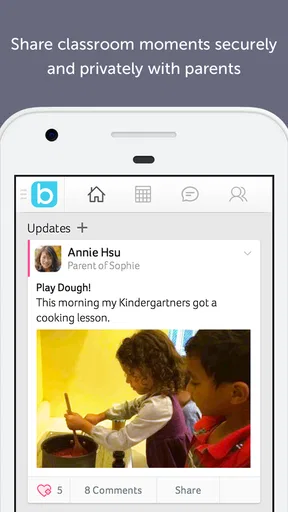
Bloomz is a communication and classroom-management app designed to connect teachers, parents, students, and school communities in one place. It can be used for announcements, private messages, class updates, calendars, event reminders, photo sharing, and academic or behavior-related communication. Before downloading, users should confirm that their school or teacher uses Bloomz, since many of its features depend on being invited to a specific class or community.
How do parents and teachers join a Bloomz class or school community?
Most users join Bloomz through an invitation, class code, school link, or email connection provided by a teacher or administrator. After creating an account, parents may need to verify their email address or phone number and connect their child to the correct classroom. It is important to check spelling and invitation details carefully, because joining the wrong class can result in missed notices or access to an unrelated community.
What communication and classroom features does Bloomz offer?
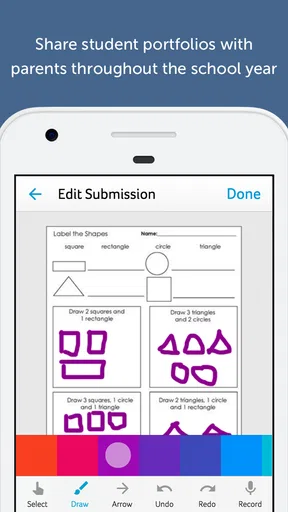
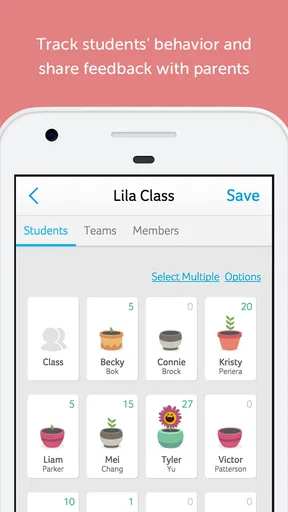
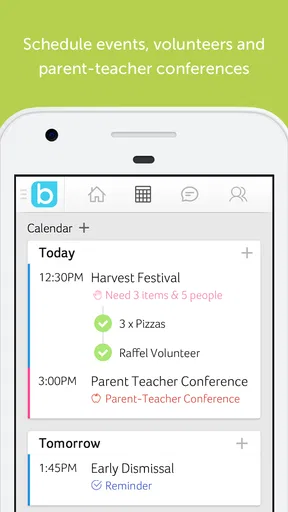
Bloomz combines several school communication tools, including class announcements, direct messaging, group conversations, event and calendar updates, volunteer coordination, reminders, and file or photo sharing. Depending on the school’s setup, teachers may also use it for attendance information, sign-ups, behavior updates, or student progress communication. Available tools can vary by account type, subscription, school settings, and the features enabled by each teacher or administrator.
Is Bloomz free to download and use?
Bloomz can generally be downloaded without an upfront charge, but the exact cost depends on how the platform is provided by a school, district, teacher, or organization. Some users may receive access through a school plan, while additional services or premium features could follow different rules. Before relying on the app, review the current listing and any in-app notices to understand whether your particular classroom or community requires payment.
Is Bloomz safe for sharing children’s school information and photos?
Bloomz is built for school-related communication and includes community-based sharing controls, but users should still review privacy settings before posting. Information, messages, photos, and documents may be visible to members of a selected class, group, or school community. Parents and teachers should avoid sharing unnecessary sensitive details, use private messaging when appropriate, and follow their school’s policies regarding student images, personal data, and online communication.


